

In many video surveillance projects, cameras are originally built for security monitoring, recording, and centralized management. As digital operations expand, the same video resources may also need to serve AI analysis, smart park platforms, emergency command systems, mobile applications, web dashboards, and third-party business systems.
The challenge is that these platforms often require different access methods. An AI analysis server may prefer RTSP streams, a web-based management platform may need WebRTC or FLV, and an emergency command system may require SIP video access. If each platform connects to cameras separately, the project becomes difficult to manage, insecure, and costly to maintain.
A video gateway provides a simpler architecture. It connects the existing surveillance network on one side and provides standardized video output for different business platforms on the other side. This allows one set of cameras to support multiple applications without rebuilding the entire surveillance system.
The Integration Problem Behind Multi-Platform Video Access
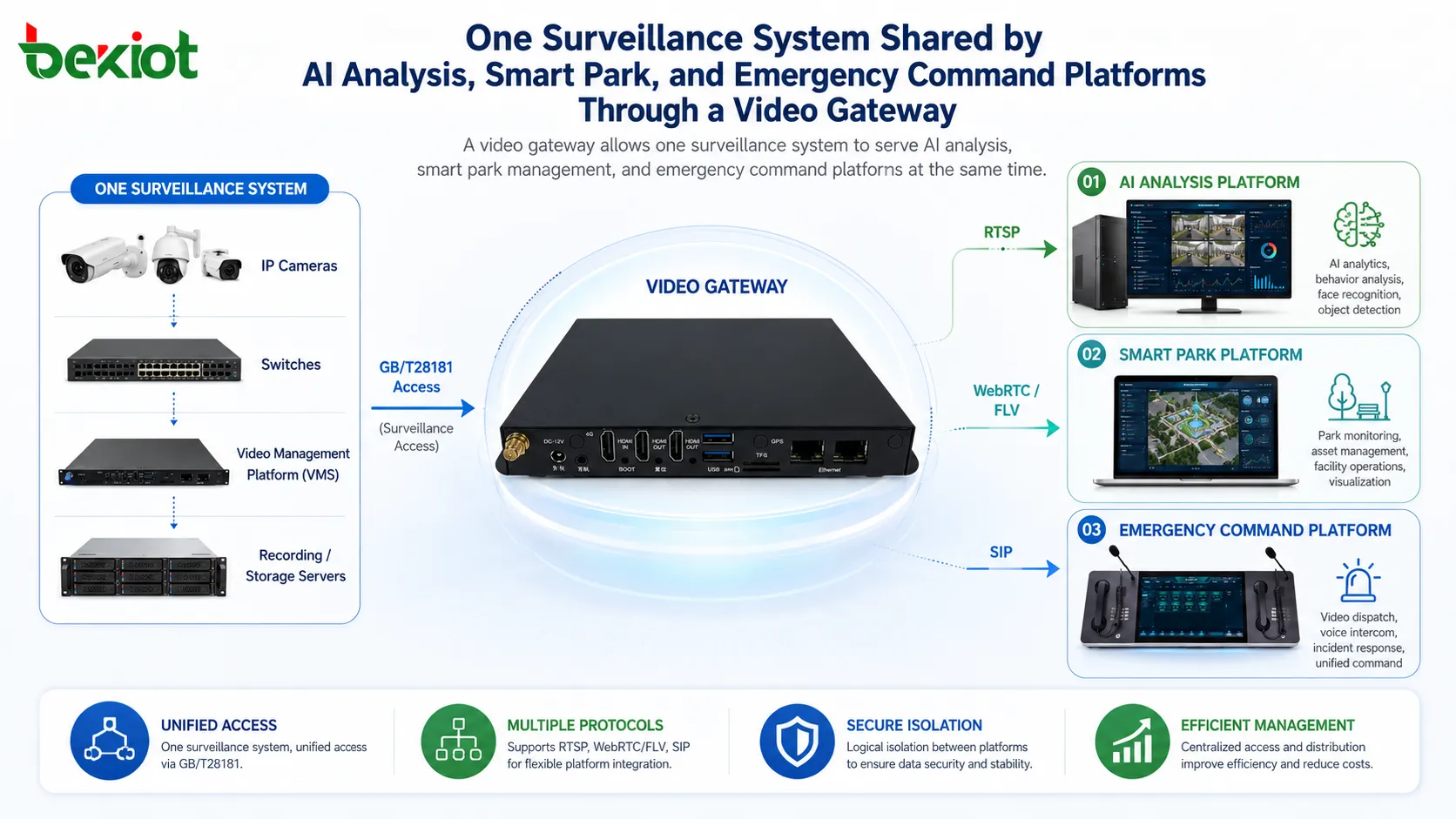
A typical surveillance network may include IP cameras, switches, optical fiber links, video management platforms, recording servers, and management servers. This system is usually designed for internal monitoring and storage, not for direct access by multiple external business systems.
When several business platforms need to call the same video resources, direct access creates many problems. Different systems may use different protocols, different networks may be isolated for security reasons, and repeated stream pulling may increase bandwidth pressure on cameras and recorders.
For example, an AI server may need stable RTSP streams for real-time recognition. A smart park platform may need low-latency web video through WebRTC or browser-friendly FLV. An emergency command platform may need SIP-based video calling or dispatch integration. These requirements are different, but the source cameras are often the same.
Without a video gateway, each platform may require separate camera configuration, separate permissions, and separate network access. This makes operation complicated and increases security risk because too many systems may need direct access to the surveillance network.
A Gateway-Based Access Layer
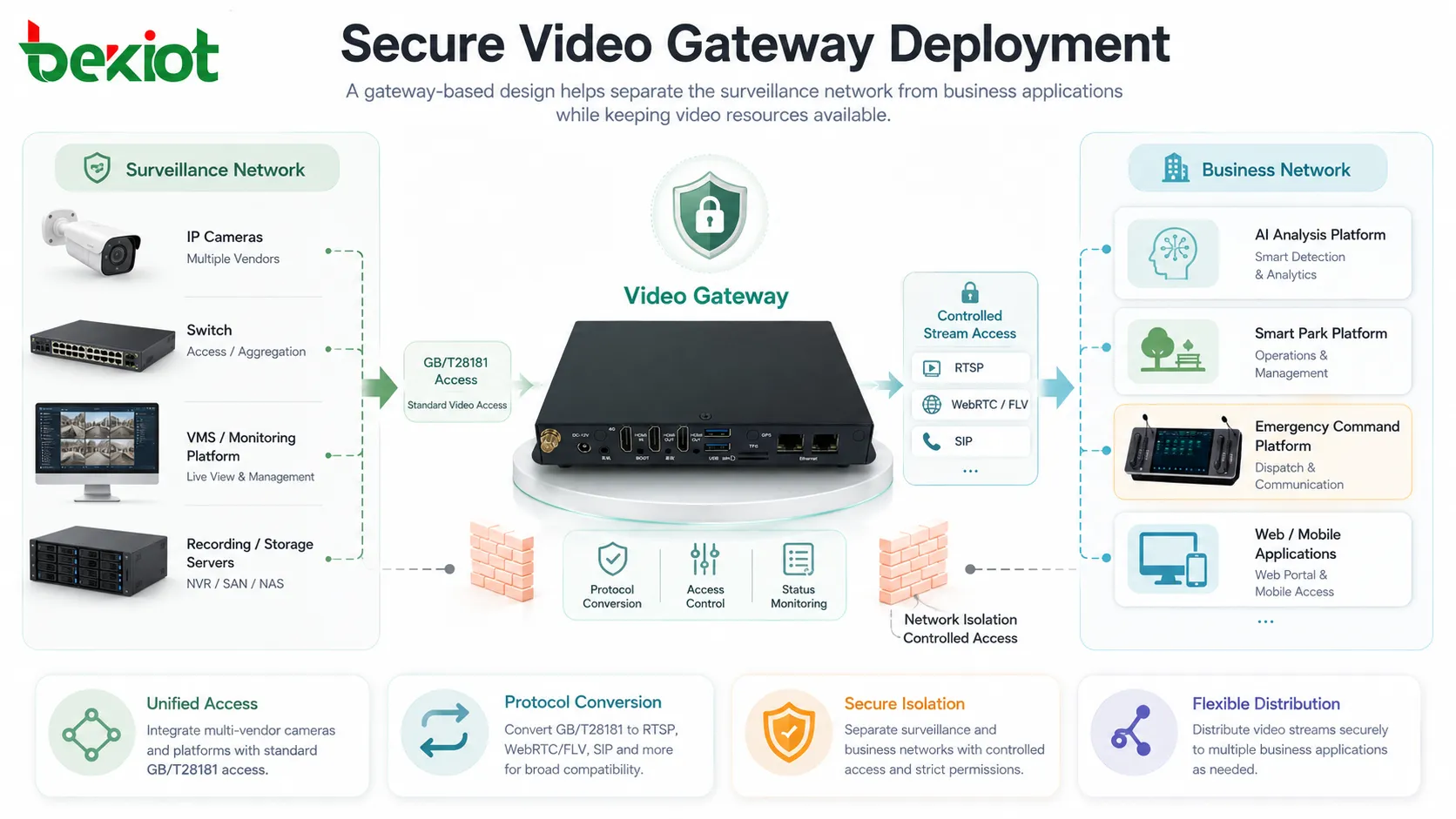
The main idea of the solution is to place a video gateway between the surveillance network and the business network. The gateway connects to the original monitoring system through a standard video access protocol such as GB/T28181, then converts or distributes video streams to different business platforms according to their requirements.
This design avoids exposing all cameras directly to every business application. The surveillance network can remain relatively independent, while the business platforms receive only the video resources they are authorized to use.
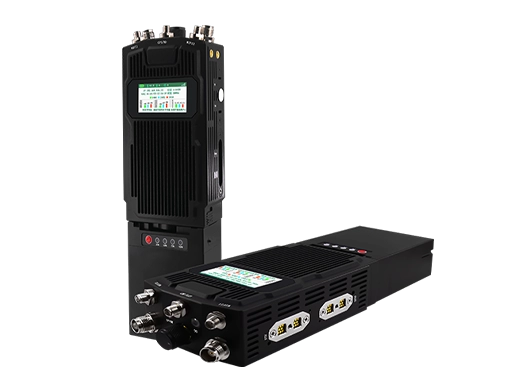
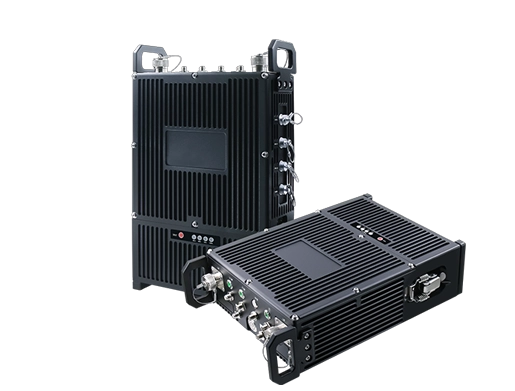
The gateway becomes a controlled access point. It can receive video from the monitoring side, manage stream requests, convert protocols, forward media streams, and provide a more unified interface for AI, web, mobile, and command applications.
How Different Platforms Receive the Same Video Resource
In a multi-platform project, each business system may need a different video format. A video gateway can simplify this by providing multiple output protocols from one access point.
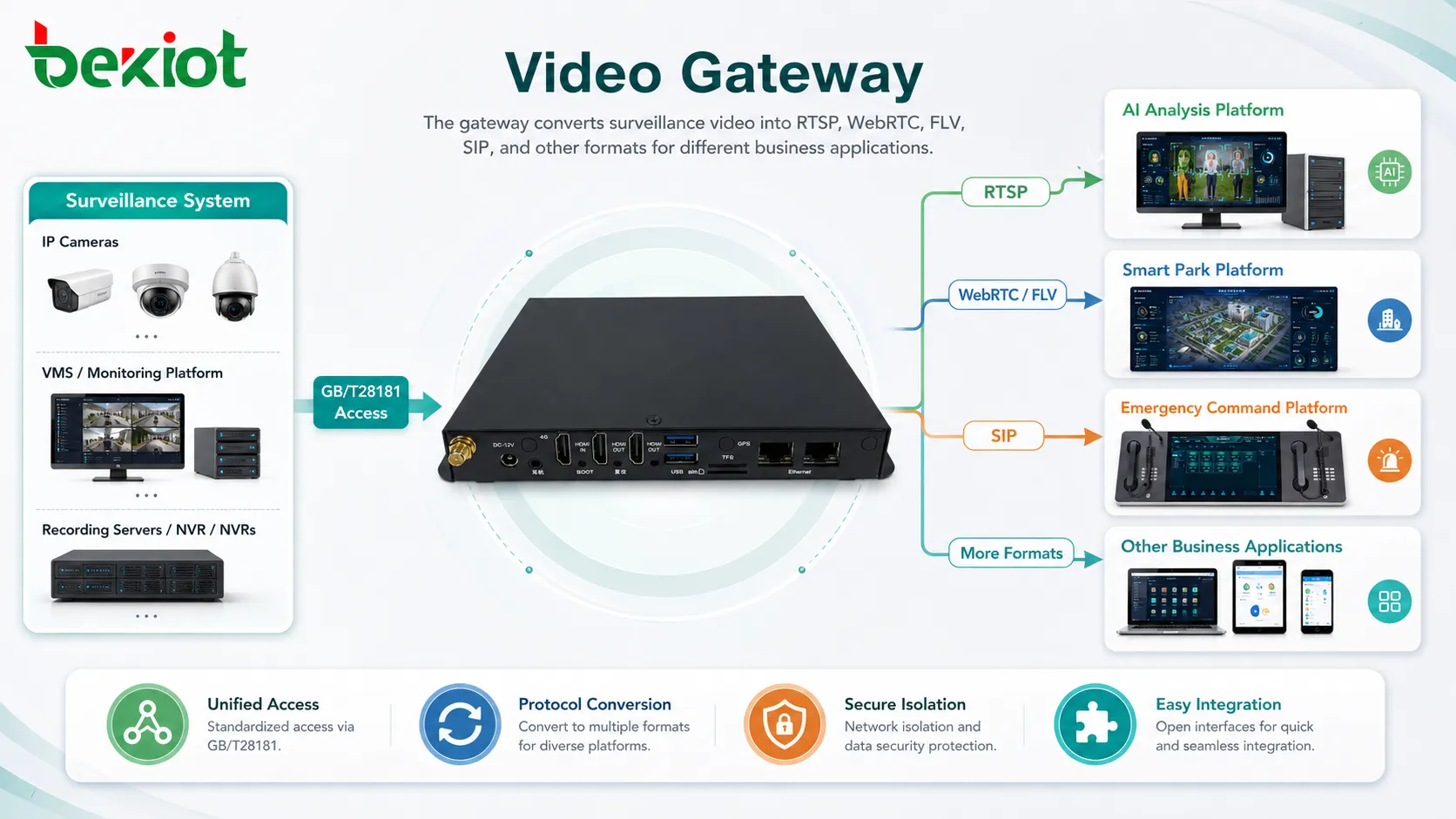
For AI analysis, RTSP is commonly used because many video algorithms, recognition engines, and edge analysis systems support RTSP input. The AI server can pull selected camera streams through the gateway instead of connecting directly to every camera.
For smart park platforms, browser preview is often more important. WebRTC can support low-latency video access, while FLV may be suitable for web-based live preview in some application environments. This helps operators view surveillance video from a web dashboard without installing traditional monitoring clients.
For emergency command and dispatch systems, SIP video access can be valuable. A command platform can call or access video resources as part of dispatch workflows, making camera video easier to combine with voice communication, incident handling, and command center operation.
Why GB/T28181 Is Useful on the Monitoring Side
In many surveillance projects, GB/T28181 is used for video platform interconnection, device registration, signaling control, and video resource sharing. When the existing monitoring platform already supports this protocol, the video gateway can use it as the main access channel.
This approach is more manageable than connecting each business platform to cameras one by one. Camera resources can be organized through the monitoring platform, while the gateway focuses on protocol adaptation and video distribution.
The result is a clearer division of responsibility. The original surveillance system continues to handle camera management, storage, and monitoring. The video gateway handles cross-network access, multi-protocol output, and business platform integration.
Reducing Network and Security Pressure
In many projects, the surveillance network and the business network are separated. This separation helps reduce security risk and keeps the video system more stable. However, it also makes cross-platform video access more difficult.
A video gateway can be deployed as a controlled bridge between these networks. Instead of opening the entire surveillance network to AI servers, park systems, or command platforms, the project can authorize video access through the gateway.
This improves security management. Access rules, stream permissions, user control, network ports, and platform relationships can be planned around the gateway. It also reduces the need for repeated camera exposure, repeated port mapping, and uncontrolled stream access.
For large projects, this architecture can also reduce pressure on the original monitoring system. Multiple business platforms do not need to pull video directly from cameras at the same time. The gateway can serve as a media forwarding point and provide streams according to real application demand.
Capacity Planning for Medium and Large Projects
Capacity planning should be based on the number of cameras, the number of platforms, concurrent viewing demand, AI analysis channels, and command center usage. A medium or large project may need to consider thousands of camera resources, hundreds of concurrent forwarded streams, and multiple display or preview windows.
For example, project design may need to evaluate whether the gateway layer can support around 1,000 camera access channels, about 300 concurrent stream forwarding sessions, and multi-window preview requirements such as 16-channel display. These numbers should be treated as planning references and adjusted according to the actual platform capability and project scale.
Bandwidth is equally important. RTSP analysis streams, WebRTC live preview, FLV web playback, and SIP video sessions have different latency and bandwidth characteristics. The project team should calculate both upstream and downstream traffic before deployment.
Typical Architecture for Three Business Platforms
A practical deployment may include one surveillance network and one business network. The surveillance network contains IP cameras, switches, optical fiber links, recording servers, monitoring platforms, and management servers. The business network contains AI analysis servers, smart park platforms, and emergency command systems.
The video gateway is placed between the two sides. It receives video resources from the monitoring network, usually through GB/T28181 or another supported access method. Then it provides RTSP streams to the AI analysis server, WebRTC or FLV streams to the smart park platform, and SIP video access to the emergency command system.
This architecture allows the three business systems to share the same video source while using the format that best fits their own application. It also avoids repeated camera integration and reduces the cost of custom development.
Benefits for Smart Project Integration
The first benefit is reuse. Existing cameras, recording systems, and monitoring platforms can continue to work. The project does not need to rebuild the entire video system just because new business platforms need video access.
The second benefit is protocol adaptation. Different platforms can receive different stream formats from one gateway layer. This helps reduce development complexity and makes the overall system easier to expand.
The third benefit is security control. Business platforms do not need direct access to all cameras. Video access can be managed through gateway permissions, stream rules, and network policies.
The fourth benefit is easier maintenance. When a camera changes, the update can be handled in the monitoring system and gateway configuration instead of changing every business platform one by one.
Where This Solution Is Most Useful
This solution is suitable for smart parks, industrial parks, campuses, transportation hubs, emergency management centers, municipal operation platforms, factories, ports, mines, energy facilities, and large building complexes.
It is especially useful when the surveillance system has already been deployed, but new digital platforms need to call the same video resources. Instead of asking each platform to connect to the surveillance network separately, the gateway provides a unified access and distribution layer.
For AI projects, the gateway provides stable video input. For web platforms, it enables browser-friendly preview. For command centers, it helps connect video resources with dispatch and emergency workflows. This makes the original surveillance system more valuable across the whole organization.
Planning Points Before Deployment
Before implementation, the project team should confirm the existing monitoring platform, camera quantity, camera grouping, network structure, available protocols, user permissions, and security requirements.
The team should also define which business systems need video, which cameras they can access, how many streams may be viewed at the same time, and whether low-latency access is required. These details directly affect gateway capacity, bandwidth planning, and protocol selection.
If AI analysis is involved, stream stability and frame quality should be tested. If web preview is required, browser compatibility and latency should be evaluated. If command dispatch is involved, SIP integration, call workflow, and video display behavior should be tested before formal deployment.
Conclusion
When one video surveillance system needs to serve multiple business platforms, direct camera integration is rarely the best approach. Different protocols, network isolation, security requirements, and concurrent stream demands can quickly make the project complex.
A video gateway provides a practical and scalable solution. By connecting to the surveillance network through standard access methods and distributing video as RTSP, WebRTC, FLV, SIP, or other formats, it allows AI analysis platforms, smart park systems, and emergency command platforms to share the same video resources more efficiently.
For projects that need fast integration, lower development cost, stronger security control, and better reuse of existing surveillance assets, a gateway-based video access architecture is a clear and effective choice.
FAQ
Can multiple platforms request the same camera at the same time?
Yes. The final result depends on gateway capacity, bandwidth, stream type, and concurrent access design. The project should test real concurrency before deployment.
Does a video gateway replace the original monitoring platform?
Usually not. The monitoring platform can still handle camera management, recording, and traditional preview. The gateway mainly provides protocol conversion and business system access.
Which stream format is better for AI analysis?
RTSP is commonly used for AI video analysis because many algorithms and video processing frameworks support it. The actual choice should match the AI platform requirements.
What format is suitable for browser-based preview?
WebRTC is useful for low-latency browser preview, while FLV can be used in some web live-view scenarios. The best option depends on browser support, latency requirements, and platform design.
How can the system avoid exposing cameras directly?
The project can place the gateway between the surveillance network and business network, then allow business systems to access only authorized streams through the gateway.
What should be tested before going live?
The project should test camera access, stream stability, protocol conversion, concurrent viewing, cross-network routing, user permissions, AI stream pulling, web playback, and SIP video workflow.